What is Aux Send on a Mixer?
In the world of professional audio, the mixer is the heart of every sound system. One important feature often found on mixers is 'Aux Send'. But what exactly is the function of this Aux Send? In short, Aux Send functions to send audio signals from the mixer to other devices outside the main path (main mix). This allows you to create separate signals that can be controlled independently.
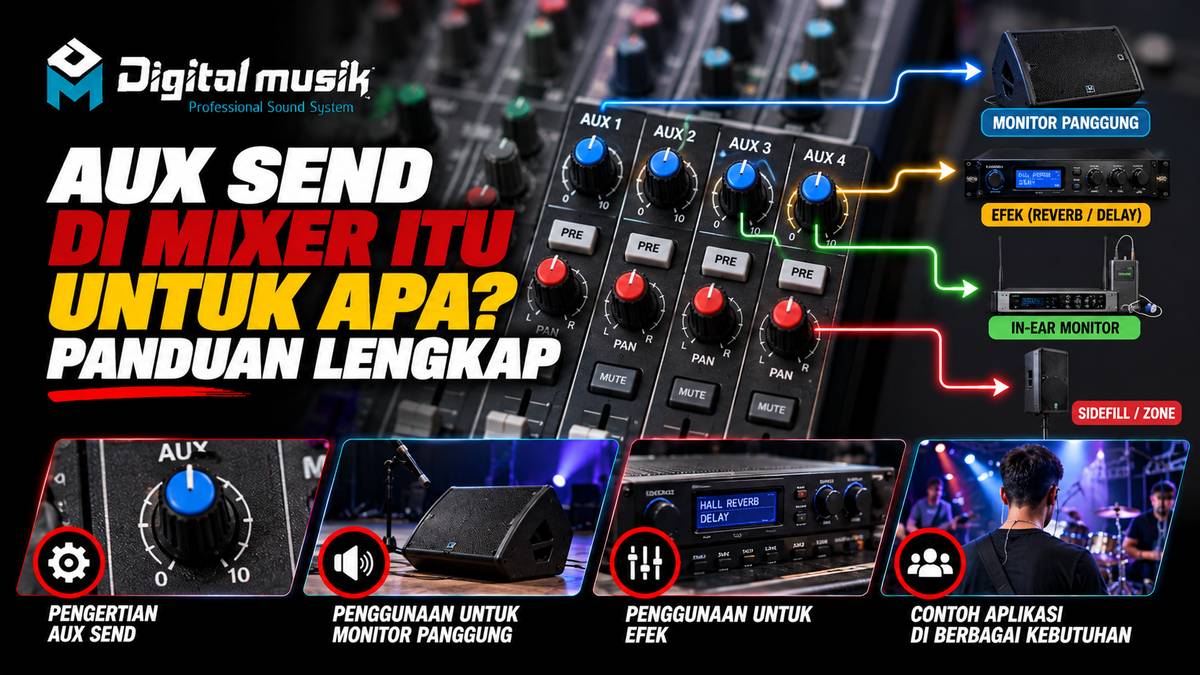
Imagine you are holding a live concert. Musicians on stage need their own sound to be heard clearly so they can perform optimally. This is where Aux Send plays a role. You can use Aux Send to send a special mix of vocals, guitar, or drums to monitor speakers on stage, without disturbing the main sound heard by the audience. This is one of the most common and crucial uses of Aux Send.
Main Functions of Aux Send
The main function of Aux Send is to create a sub-mix or separate signal path. This provides incredible flexibility in various audio scenarios, whether for live performance, studio recording, or permanent installations.
Here are some specific functions of Aux Send:
- Monitoring for Musicians: As mentioned before, this is the most common function. Aux Send is used to send signals to stage monitors or in-ear monitors (IEM), so each musician can hear what they need on stage.
- External Effects: Aux Send is also often used to send signals to external effects units, such as reverb or delay. The signal processed by the effect is then sent back to the mixer via Aux Return to be mixed with the original signal.
- Additional Sound Systems: In some cases, Aux Send can be used to send signals to additional sound systems in other areas, for example, in a separate FOH (Front of House) area or even to a recording control room.
- Multitrack Recording: When recording, Aux Send can be utilized to create a special monitor mix for musicians who are recording, ensuring they get a comfortable sound reference.
How Does Aux Send Work?
On a mixer, you will find buttons or knobs labeled 'Aux Send' or 'FX Send' which are usually on each input channel, along with the level control for that channel. Each Aux Send usually has its own Master Level knob in the output section of the mixer.
The process is roughly as follows:
- Select Channel: You select the input channel whose signal you want to send (for example, lead vocal).
- Set Aux Send Level: You turn up the Aux Send knob on that vocal channel. The higher the knob, the more vocal signal is sent to the Aux path.
- Set Monitor/Effect Mix: Signals from all channels for which you have set the Aux Send will gather in the main Aux Send path. You can then adjust the balance of these signals in the Aux Send Master path. If this is for stage monitors, you will adjust how much vocal, drums, guitar, etc. is heard by the musicians. If for effects, you adjust how much of the original signal you want to add effects to.
- Send to Destination Device: The output of this Aux Send path is then connected to an external device, such as a monitor amplifier, monitor speaker, or effects unit.
Aux Send Differences (Pre/Post Fader)
It is important to understand the difference between Aux Send set to 'Pre-Fader' and 'Post-Fader'. This setting affects whether the sent signal is influenced by the position of the main channel fader.
- Pre-Fader: The signal is sent before the main channel fader. This means that if you lower the main channel fader, the signal sent to Aux Send will not change. This is very useful for stage monitors, as you can adjust the level of the musician's vocals in their monitors independently of the vocal level heard by the audience.
- Post-Fader: The signal is sent after the main channel fader. If you lower the main channel fader, the signal sent to Aux Send will also go down. This is more often used to send signals to effects units, as you want the effect to follow changes in the original signal level.
Many mixers provide this option, sometimes via a switch button next to the Aux Send knob.
When Do You Need Aux Send?
Generally, you will need Aux Send if you require:
- Clear Monitoring for Musicians: This is the most common reason. Without Aux Send, musicians will struggle to hear themselves on stage.
- Use of External Effects: To add a professional touch like reverb or delay to vocals or instruments.
- Sending Signals to Different Audio Zones: If you need to send audio to other areas not directly connected to the main output of the mixer.
Choosing the Right Mixer for Your Needs
The number of Aux Sends available on a mixer can be a determining factor when choosing a device. Small mixers for home use might only have one or two Aux Sends, which might be enough to send a signal to one monitor speaker or a simple effect. However, for larger live stages or professional recording studios, you might need a mixer with four, six, or even more Aux Sends to accommodate complex monitoring needs for many musicians and the use of various effects.
If you are planning a professional audio system and need a deeper understanding of how mixers, including the Aux Send feature, can be integrated with custom speaker cabinets, flight cases, or other audio fabrication needs, PT Digital Musik Indonesia is ready to be your discussion partner. We operate in the professional audio ecosystem and can help map your specific needs to create optimal audio solutions.